Flows and campaigns
Agent work as code: run steps on a trigger, or one job across many repositories.
A flow is a TypeScript file that tells agents what to do, step by step. It starts by hand, from a signed webhook or on a schedule. Each run is an ordinary session you can watch, steer and stop, and it survives a restart: a step that finished never runs again.
Build a flow in the web app
Admins build flows without a file. On an empty Flows page, pick a starter: On a schedule (run the tests every night and fix what fails), When a webhook arrives (write release notes when a release is published) or One change across many repositories (bump a dependency everywhere). Each starter fills in New flow for you to change and save. Or open Flows → New flow and fill in:
- Name: lowercase, such as
weekly-deps. - Starts: by hand, on a schedule (
1d,6h), at a time of day on the days you tick (in UTC), or when a signed hook arrives on a key. - Steps: one message per line. Each is sent when the one before has been answered.
- For each repository (optional): tick repositories (
Find another repositorysearches the rest), and the steps run once in each, side by side: a campaign.
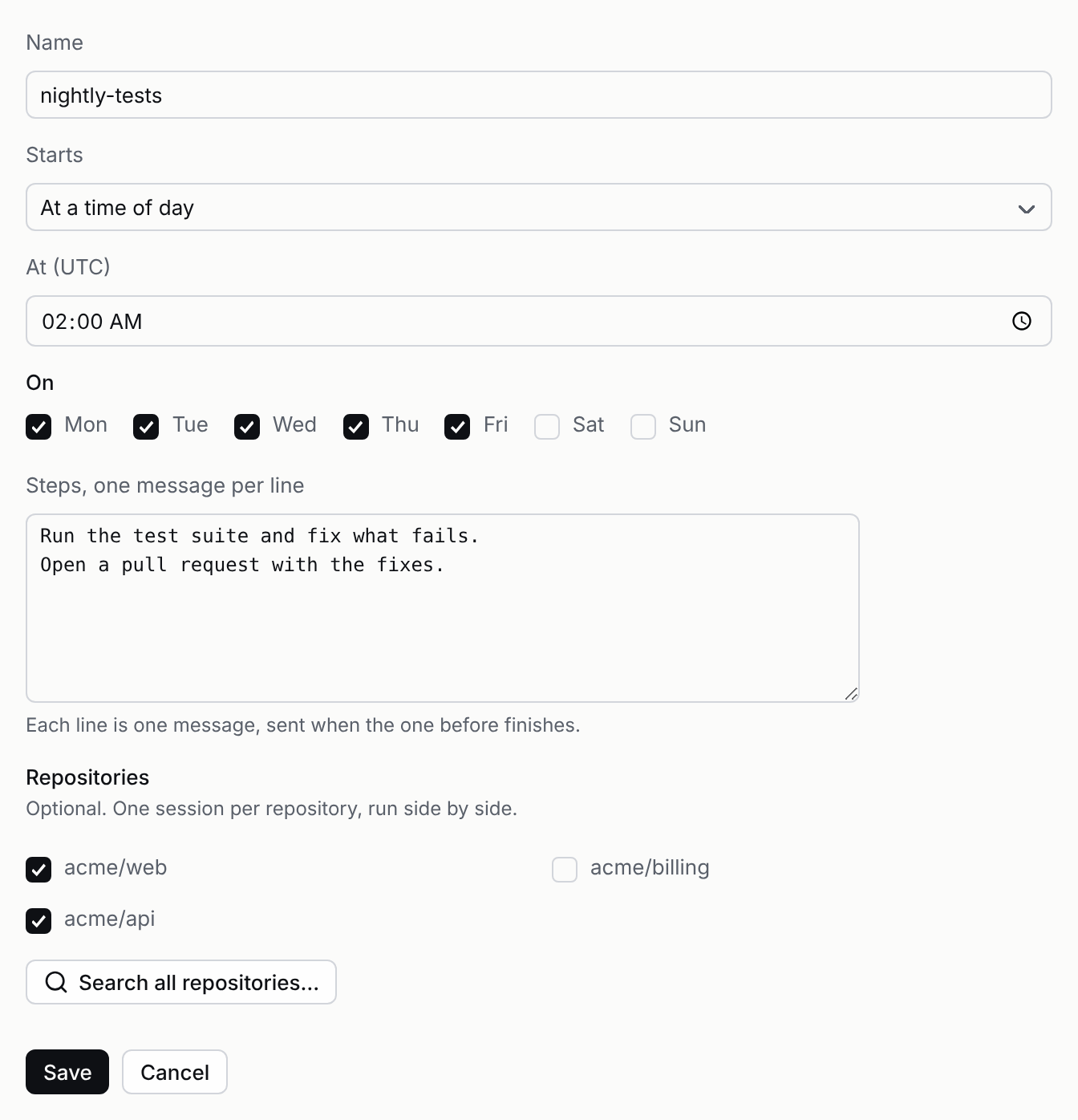
Save, and it is listed beside file flows with a Run button. Edit changes the next run; a run already going keeps its steps. Delete removes the flow; its runs stay ordinary sessions. Members can run built flows but not build, edit or delete them. A built flow is stored on the server and survives restarts like a file flow (below). Over HTTP: PUT /flows/:id with { on, steps, repos? } and DELETE /flows/:id (HTTP API).
Make a flow by chatting
You don't have to fill in a form. In any session, ask for what you want to happen by itself: "every weekday at nine, summarize yesterday's merged pull requests", or "when a release is published, write its release notes". The agent drafts the flow and shows it in the session as a card, in plain words:
- Starts: when it runs, such as
Weekdays at 09:00 UTC,Every 6 hours,Run by handorWhen the release-published webhook arrives. - Runs: in a new session each run, or once in each repository it names.
- The steps, in order.
Nothing is saved until you choose. Save (Enter) saves it as you: the card becomes a quiet "Saved" line with Open flow, and the flow is on the Flows page with your name. Edit in builder opens it in New flow, filled in, to change first; saving there closes the card and brings you back to the session. Dismiss (Esc) drops it, and the agent hears that it wasn't saved. The card waits for as long as it takes, through a server restart too.
To change a flow, say so in the session: "make it Mondays only". The agent proposes the change and the card shows it as a diff, the old line struck out and the new one added; Save applies it.
Already did the work by hand in a session? Press Make this a flow at the top of the session (in the terminal, /flow in pistis attach; over MCP, make_flow). The agent drafts a flow from the messages you sent there and proposes it on the same card.
Only people who may build flows (admins, by default) see Save. Anyone else sees the card with Dismiss, and someone who builds flows can save it from the session. The agent can't save a flow by itself, and a proposal that isn't a valid flow (a bad name, a schedule under a minute, no steps) is never shown: the agent hears why and fixes it. In Slack the proposal appears in the thread in words with Dismiss; save it in the web app. Over HTTP and MCP it is a waiting approval of the save_flow tool: list_approvals says it in words, and approving it (POST /sessions/:id/approvals/:key or decide_approval) saves it, for someone who may build flows.
Write a flow
Put files in a folder and name it in pistis.json as "flows": "./flows", or pass --flows ./flows to pistis dev. A folder made by npm create pistis already has flows/ and the package; elsewhere, install @pistishq/sdk next to the server:
npm i @pistishq/sdkimport { flow } from "@pistishq/sdk/flows";
export default flow({
id: "nightly",
on: { every: "1d" }, // or { manual: true }, { hook: "deploy-done" }, { at: "09:00", days: ["mon"] } (UTC)
async run(ctx) {
await ctx.say("Run the test suite and fix anything that fails.");
await ctx.say("Summarize what you changed.");
},
});ctx.say sends a message to the run's session and waits for the agent's answer. Open Flows in the web app to start a manual run and see past runs.
One job across many repositories
A campaign is a flow that does the same job in many repositories at once: bump a dependency everywhere, add a license file, move every service to a new client. ctx.child starts one session per repository and lets you drive each one.
import { flow } from "@pistishq/sdk/flows";

export default flow({
  id: "bump-lodash",
  on: { manual: true },
  concurrency: 4,                 // at most 4 repositories at once
  async run(ctx) {
    const repos = ["github:acme/api", "github:acme/web", "github:acme/docs"];
    const results = await Promise.all(
      repos.map((repo) =>
        ctx.child({ key: repo, repo }, async (s) => {
          await s.say("Bump lodash to 4.17.21, fix what breaks, run the tests.");
          return s.say("Commit and publish a pull request.");
        }),
      ),
    );
    const failed = results.filter((r) => r.status === "failed");
    await ctx.say(`${results.length - failed.length} done, ${failed.length} failed`);
  },
});- One session per repository. Each is checked out on its own repository and opens its own pull request. They show nested under the run in the sidebar.
- A limit on how many run at once.
concurrency(1 to 32, default 4) is per run, and the whole server runs at most 64 at once across every run, so a large campaign (or many of them) waits its turn instead of starting hundreds of sandboxes. A run starts at most 10,000 sessions. - A failure stays alone. A repository that fails, or that no administrator enabled, comes back as
{ status: "failed", reason }. The rest keep going. Nothing throws: each result isdone,failedorstopped. - Progress you can see.
Flowsshows each run as3 done · 1 failed;GET /flows/:id/runslists every repository's state. - Stop means stop. Stop the run's session and every repository's session stops with it, even mid-step. Stopping one repository's session stops only that one.
- Safe across restarts. No repository gets a second session, and no step is sent twice (below).
Review every pull request
Gate publish (see Approvals). Each repository then waits under Needs you with its diff, and you approve them one by one.
Where runs show up
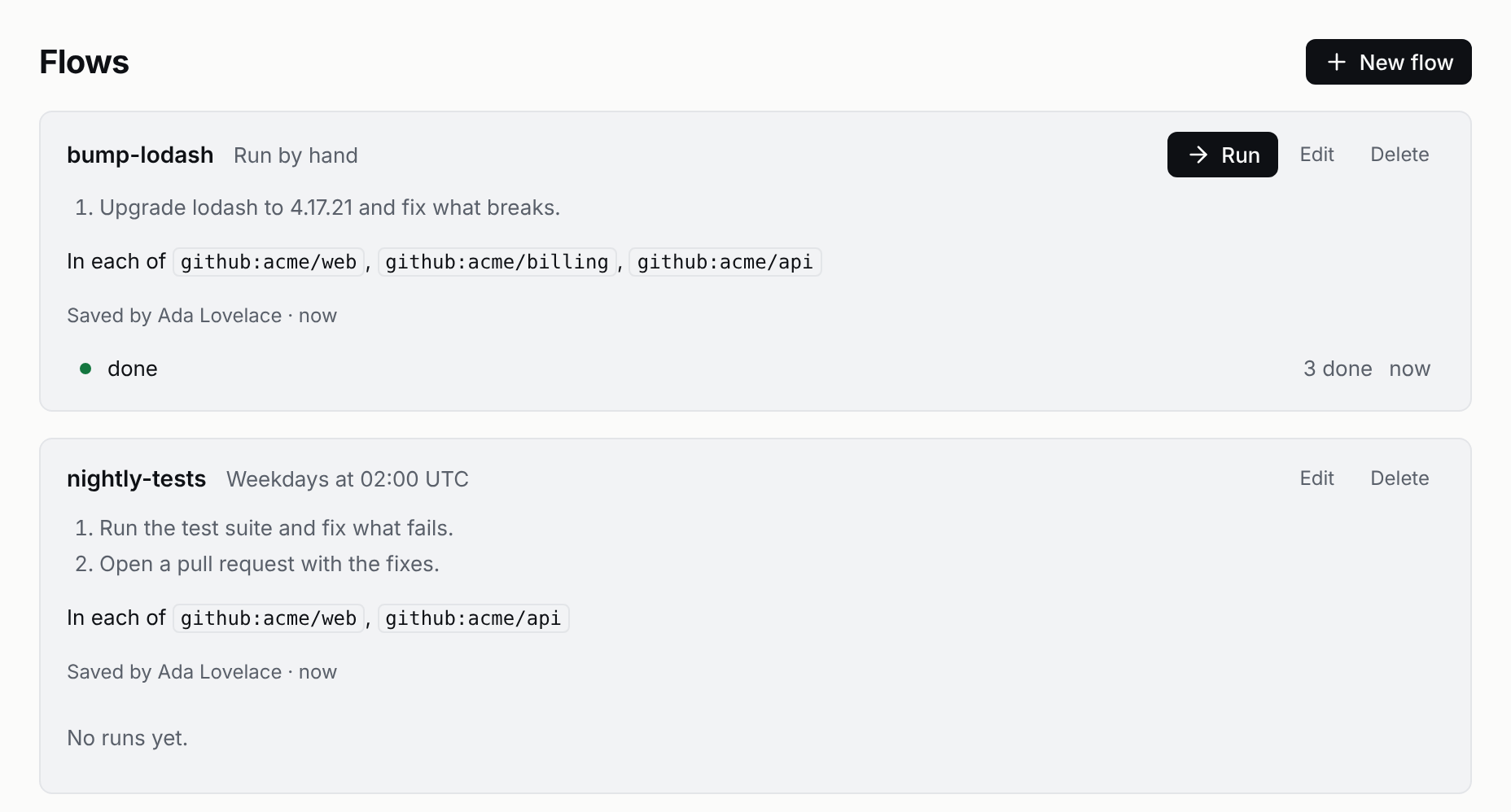
Flows in the sidebar lists each flow, what starts it, and its runs with their progress: start a flow or read its history there. A run is a session, so you follow it like any other: under Running while it runs, with each repository's session nested under it, and under Needs you when one waits for an approval.
How a run survives a restart
If Pistis stops mid-run, it runs the flow's code again from the top when it comes back. Every step already taken answers from the record instead of happening again:
- Each step is numbered. The third
ctx.sayof a run is always step 3. On the rerun, step 3 finds the message it already sent and waits for (or reads) its answer. Nothing is sent twice. - Each repository's session is named by its key.
ctx.child({ key: "github:acme/api" })finds the same session on the rerun, and its steps are numbered the same way. A repository that finished replays its answers at once. - Progress is recorded as it happens. Each key's state (running, done, failed, stopped) is written to the run's session, so the Flows page and
GET /flows/:id/runsare right even after a crash. - A step the crash cut off is not run again. Pistis can't know whether it finished, so it records that and the run goes on; the agent sees it and can check.
- Schedules come back. An
everyflow's next run is a stored time, set again when Pistis starts.
Write runs that take the same path twice
Because the code runs again from the top, decide what to do from answers and the payload, never from the clock or a random number, and keep side effects inside agent steps. Then a rerun walks the same steps and every one of them comes from the record.
Things to know
- Use a key that names the work, such as the repository. A key is used once per run.
- Only repositories an administrator allowed under
Source controlcan be used. - A run's sessions belong to whoever started it. A hooked or scheduled run belongs to the flow: an admin can stop it and approve its steps, and anyone allowed to see flows can watch it.
- A child can't start another child; it is refused.
- Flows don't yet run on several Pistis servers sharing one database. Run them on a single
pistis serve.