MCP servers
Give agents extra tools from MCP servers without putting keys in the sandbox.
An MCP server adds tools the agent can call, such as searching your docs or reading a database. Your Pistis server makes every call, so each one is recorded, can wait for approval, and never puts a key in the sandbox.
To drive Pistis itself from another agent or MCP client, see Drive Pistis from an agent.
Choose where the server runs
| Placement | Where it runs, and what it gets |
|---|---|
remote | Hosted elsewhere and called over HTTP by your Pistis server. Gets the headers you set, which may hold keys. Use it for hosted and internal APIs. |
brain | A process on your Pistis server. Gets only the env you list. Use it for trusted local servers that need a key. |
sandbox | Inside the session's sandbox. Gets no secrets. Use it for servers that work on the files, such as browsers and language servers. |
Add an MCP server
- Open
Control center→MCP serversand clickAdd server. - Paste the server's address, or start from a well-known one (GitHub, Linear, Sentry, Notion, Context7, DeepWiki): it fills in the address and a name.
- Click
Check connection. Pistis finds how the server signs in and lists the tools it offers. Nothing is saved yet. - Choose who can use it: tick the agents that get it. People whose role lets them start sessions can pick those agents.
- Click
Add server. Each ticked agent gets a new revision with the server.
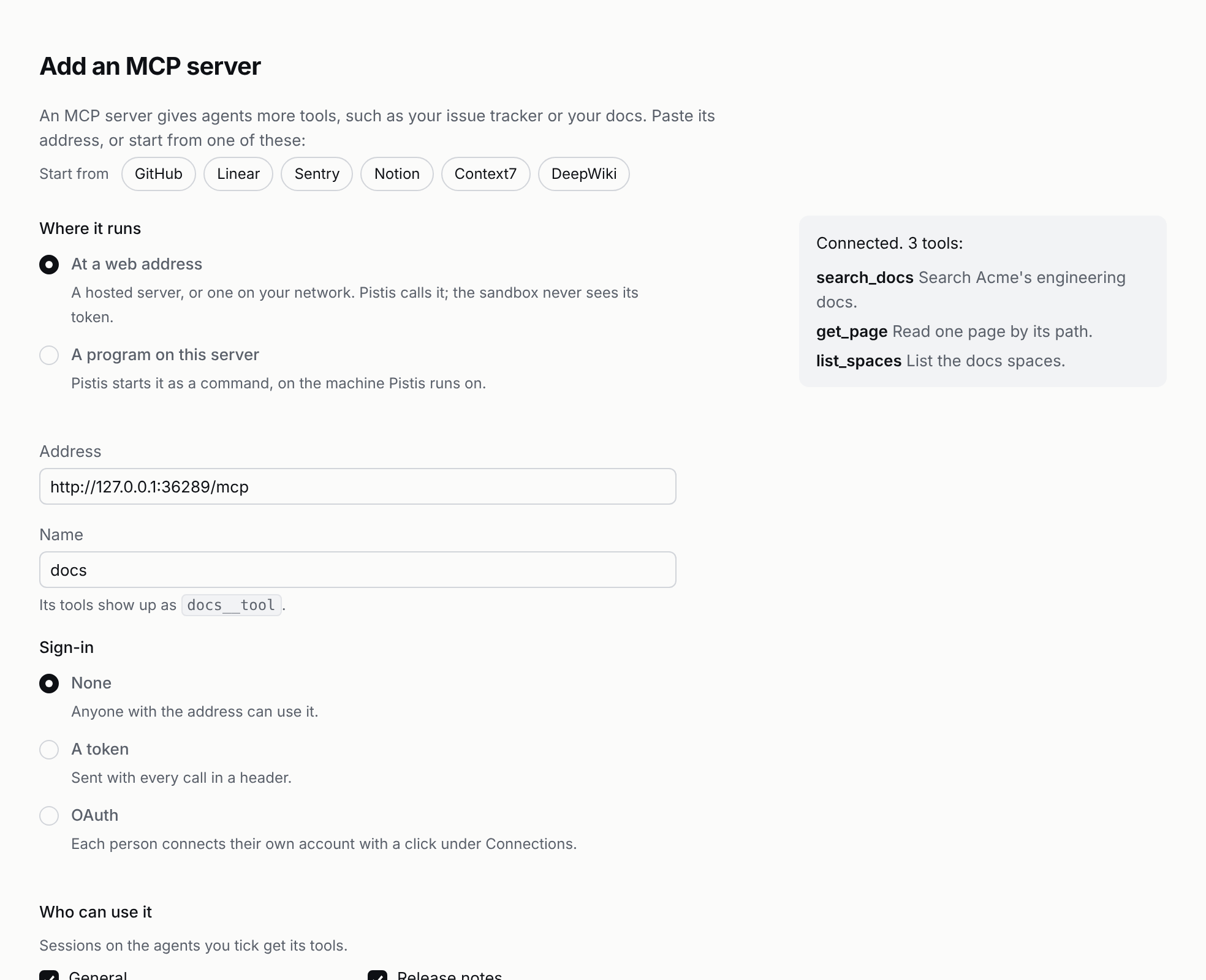
| The check finds | What happens |
|---|---|
| No sign-in | Sessions on the ticked agents can use it at once. |
| A token | Paste one shared token, kept sealed, or let each person add their own under Connections. |
| OAuth | Each person clicks Connect under Connections and signs in with their own account. Connect yours, then Discover tools lists what it offers. |
| A problem | It says what's wrong in plain words: a host it can't find, nothing listening, an address that isn't an MCP server, a refused token. |
A program that runs on your Pistis server (A program on this server) is started by Pistis on that machine, not in a sandbox: it can read what Pistis can read there. The check starts it and lists its tools. Add only programs you trust.
Add servers to an agent
Add MCP servers in an agent's form or its .mcp.json (Agents). A session sees exactly the servers its agent lists.
Add servers for every session
- Write the servers to a file:
{
  "servers": [
    { "name": "docs", "url": "https://mcp.example.com/mcp",
      "headers": { "authorization": "Bearer ${DOCS_TOKEN}" } },
    { "name": "db", "command": "npx", "args": ["-y", "@example/postgres-mcp"],
      "env": { "DATABASE_URL": "${READONLY_DATABASE_URL}" } }
  ]
}- Start Pistis with the file and the keys it names:
DOCS_TOKEN=… READONLY_DATABASE_URL=… pnpm pistis dev --mcp mcp.jsonPistis fills ${VAR} from its environment, so the file holds no keys. A missing variable stops the start instead of sending an empty key. With pistis serve, put the same list under mcp in pistis.json.
Let each person use their own account
Some servers should act as the person, not as one shared account: an issue tracker, a calendar, a CRM. Mark a remote server "auth": "per-person" in the agent's MCP servers:
[{ "name": "tracker", "placement": "remote", "url": "https://tracker.example.com/mcp", "auth": "per-person" }]- Each person connects once. Under
Your name→Connectionsthey paste their own token. It is kept in the secret store, never shown again and never sent to a sandbox. Over HTTP:PUT /connections/mcp/trackerwith{ "token": "…" };DELETEremoves it. - An admin discovers the tools. After connecting their own account, an admin opens
Control center→MCP serversand clicksDiscover tools. The tools are pinned in a new revision of each agent that uses the server. - Sessions call as their owner. A call in Ann's session uses Ann's token, in Bob's session Bob's. If someone hasn't connected yet, the tool says where to connect, and nothing is sent to the server.
Connect with OAuth
A server that speaks the MCP authorization flow needs no pasted token: add "connect": "oauth" and people click Connect instead.
[{ "name": "tracker", "placement": "remote", "url": "https://tracker.example.com/mcp", "auth": "per-person", "connect": "oauth" }]Pistis asks the MCP server where its authorization server (the service that issues its tokens) is, from its 401 and its protected-resource metadata. It signs in with PKCE (S256) and names the server as the token's resource, so a token for one server never works on another. It identifies itself with the first of these that works:
- A client an admin registered at the authorization server, if the server entry carries one:
"oauth": { "clientId": "…", "clientSecret": "…", "scope": "…" }. The secret is sealed with the revision. - Its own client metadata document (a public JSON file that describes Pistis as a client), served at
<publicUrl>/.well-known/mcp-client, when the authorization server accepts those andpublicUrlishttps. - Dynamic registration, once per authorization server, when it offers that.
If none works, or the authorization server has no S256, Connect says so and asks for an admin; nothing is sent. The link back to Pistis works once, within ten minutes, and only for the person who clicked Connect. The tokens go to the secret store. Over HTTP, POST /connections/mcp/tracker/connect returns the link to open; pnpm pistis connect tracker prints it.
After that, Pistis keeps the sign-in fresh:
- A token about to expire is renewed before the call, and the new refresh token replaces the old. Calls that arrive during a renewal share it.
- A server's
401gets one renewal and one re-send. - A renewal cut off mid-way, or a refresh token the authorization server rejects, is not retried. The connection is marked needs reconnecting, the tool says so, and
Your name→ConnectionsoffersReconnect. - A
403 insufficient_scopeis recorded on the connection; the next Reconnect asks for all the scopes needed so far. After four in a row, Pistis stops asking. Removerevokes the tokens at the authorization server.
Your name → Connections shows each connection's state and granted scope.
Enterprise-managed authorization
If your identity provider supports enterprise-managed authorization, nobody clicks Connect. Turn on enterpriseAuth on the OpenID Connect sign-in method and mark the server "connect": "enterprise".
- Pistis trades the person's sign-in at the identity provider for an ID-JAG: a signed note from the provider that names the person and the MCP server (Cross App Access, by RFC 8693 token exchange).
- The server's authorization server turns the ID-JAG into a token.
The identity provider's policy decides who may reach which server; a refusal shows in the session. A server whose authorization server doesn't accept ID-JAGs is refused, never sent to a consent screen. Pistis keeps the ID token from the person's last sign-in; when it lapses, the session asks them to sign in again.
Pistis as an MCP server, with OAuth
MCP clients that drive Pistis (Drive Pistis from an agent) can sign in with OAuth instead of an API token. It needs an https publicUrl; API tokens keep working. Each person's role decides whether they may, and whether clients get full access or read-only (Who may use it).
/mcpis a protected resource whose metadata names Pistis as its authorization server.- A client brings its client metadata document or registers dynamically. The person sees who asks and where the browser returns to, and allows it.
- The token works for
/mcponly, for an hour, with a rotating refresh token. Asessions:readtoken gets403 insufficient_scopefrom tools that change anything. - With
enterpriseAuthon a sign-in method, Pistis also accepts that provider's ID-JAGs (jwt-bearer), as the person the provider names. The client must be the one the assertion names and must authenticate: it registers withtoken_endpoint_auth_methodclient_secret_basicorclient_secret_postand sends the secret it gets back.
Authorization codes require S256 PKCE and are bound to the client, redirect and resource. Refresh-token reuse revokes the grant's token family. During an upgrade, let existing short-lived authorization codes expire before restarting if replay revocation must cover codes issued by the previous version.
See every server
Control center → MCP servers lists every server sessions can use, from pistis.json and every agent: where it runs, whether it uses a shared credential or each person's own, which agents use it and how many people have connected. Test connects to a shared server and shows its tools and how long that took. Add server adds one (above).
What the agent sees
Each tool is named <server>__<tool>, such as docs__search, with the server's own description. Gate a whole server with docs__* in approvals.
When something fails
- Pistis restarts during a call. The agent is told the call was cut off. The call is not sent again.
- The connection drops during a call. The call fails as "may or may not have taken effect". Nothing is retried for you.
- A server is down when Pistis starts. Pistis logs
mcp.unavailableand leaves out that server's tools until the next start.
A server on your Pistis server runs with its privileges.
Run only servers you trust there. Anything you don't trust belongs in the sandbox, without keys.