Approvals
Make risky steps wait for a person.
An approval makes a tool wait for the person who started the session. Each call to that tool pauses until they click Approve or Deny. When you trust a task, you can send it in Auto mode instead: its waiting steps go ahead for that one message, recorded as approved by you.
Choose what waits
List tools by name in one of these places:
- For one agent: the agent's
Tools that wait for approvalfield. It applies to every session on that agent. - For the whole server:
"approvals": ["publish"]in pistis.json. - On your laptop:
pnpm pistis dev --require-approval bash. Repeat the flag for more tools.
Any tool can wait: bash, the file tools, publish, MCP tools and tools from plugins. Write an MCP tool as <server>__<tool>, or <server>__* for all of a server's tools. A name that matches no tool stops Pistis from starting, so a typo can't leave a tool open. So does a tool that never waits for a person (ask, subagent, codemode, wait_until, wait_for, propose_plan, name_session, the skill tools): the message lists the tools that can, and an agent naming one isn't saved.
Approve or deny
- Open the session. Its status reads
Needs you, and the browser tab title starts withNeeds you ·. - Read the question above the message box, such as Open a pull request on acme/api? or Run
npm publish?. OpenDetailsto see exactly what it will do: the pull request’s title, description and files, the whole command, or the file change. - Click
Approveto run it, orDenyto refuse it. The agent is told either way.
In Slack, the thread shows the same buttons; a click is yours once your Slack account is linked, and Pistis checks it like a click in the web app. In the terminal, pistis attach prints the step with approve? y/n: type y or n. Over HTTP, use GET /sessions/:id/approvals and POST /sessions/:id/approvals/:key (HTTP API). Every decision is in the audit log with who made it.
Get told when a session needs you
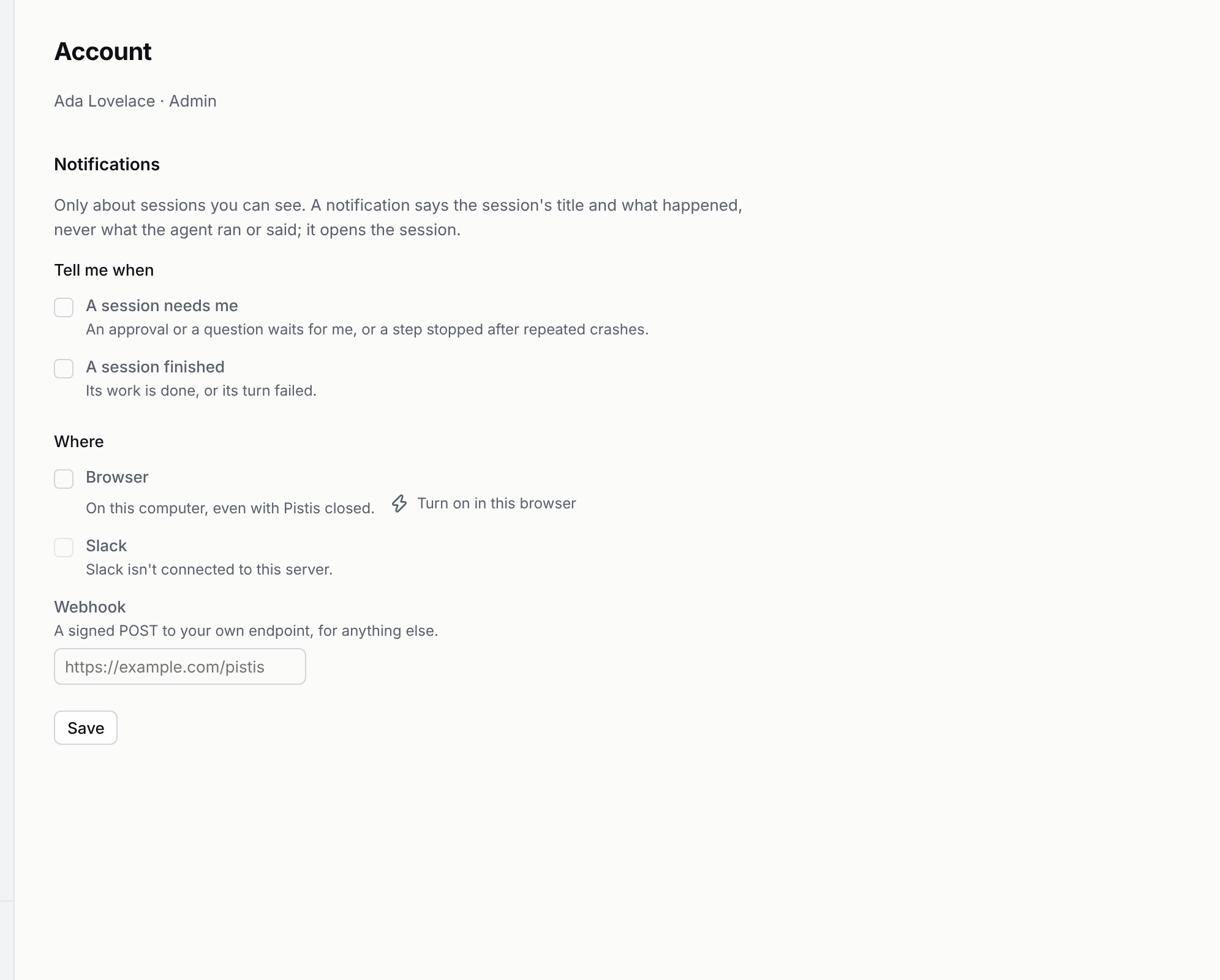
Open Account from the menu. Under Notifications, choose when: a session needs me (an approval or a question waits, or a step stopped after repeated crashes) and a session finished (done, or its turn failed). Then choose where:
- Browser: click
Turn on in this browserand allow notifications. They arrive with Pistis closed. - Slack: a direct message from the Pistis bot, once your Slack account is linked.
- Webhook: a POST to your own URL for anything else. Pistis shows its signing secret once. Each delivery carries
x-pistis-signature: sha256=<HMAC-SHA256 of the body>,x-pistis-eventand a delivery id inx-pistis-delivery.
A notification says the session's title, what happened and one line, and links to the session. It never includes a command, a tool's output or what the agent wrote. You hear only about sessions you can see: yours, and ones shared with you. A viewer hears when a session finished, not that it needs someone. Each event is sent once per channel; a failed send is tried twice more, then dropped and logged. Over HTTP: GET and PUT /account/notifications.
Who decides
The person who started the session decides, and so does anyone they shared it with as an approver. Admins can't decide for someone else. Anyone else who tries is refused, and nothing changes.
A step waits until someone answers, even if Pistis restarts in between.
Auto mode: let one turn go ahead
Send a message in Auto mode when you trust the task: every step that would wait runs at once, approved by you as it is called. It holds for that one message; your next message in Agent mode waits for you again.
- In the web app: pick Auto in the mode pill under the message box, next to Agent and Plan. The message is tagged
Autoin the timeline. - In the terminal:
/auto fix the failing testinpistis attach. - Over HTTP and MCP:
"mode": "auto"onPOST /sessions/:id/messagesorsend_message.
Auto mode is off until an admin turns it on: "autoMode": true in pistis.json, or pnpm pistis dev --auto-mode. Without it, Pistis refuses the mode and the pill doesn't offer it. Only someone who may decide approvals in that session can send an Auto message; a collaborator is refused. An approver's Auto message approves only while they still are one: revoke their share and its remaining steps wait for a person.
Every step it lets through is recorded as approved by you, marked auto, and logged as approval.auto with your name.
What to gate
Text in a repository can mislead the model, and the model can call any tool you gave it. At a minimum, gate publish so nothing reaches your code host without a person. Gate bash to read every command first. Each call is approved on its own.